
Team Productivity Insights
The Team Productivity Insights offers a comprehensive overview of individual recruiter performance.
You can efficiently generate a report for all recruiters, incorporating Key Performance Indicators (KPIs) to assess whether operations align with your goals.
How to Generate a Report
Section titled “How to Generate a Report”Once inside the Team Productivity Insights, follow these steps to create a report:
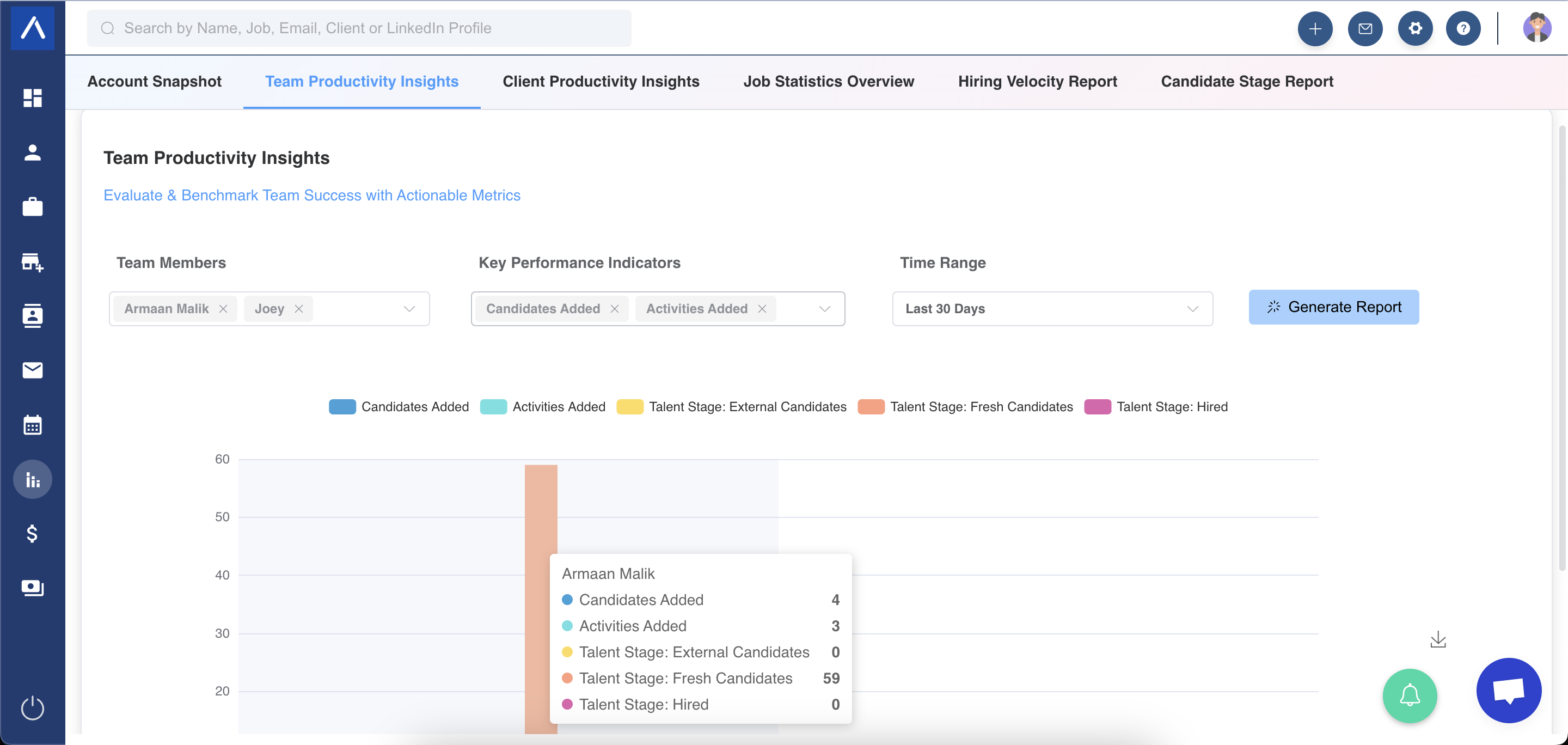
- Select Recruiters from the user dropdown menu.
- Choose the desired KPIs from the KPI selection menu.
- Pick a Time Range from the dropdown or set a custom range.
Available KPIs in the Report
Section titled “Available KPIs in the Report”- All stages in your Primary Recruitment Workflow.
- Notes and Activities linked to a specific Recruiter.
- Stages of candidates within the Candidates Pitched Pipeline.
- Entity Records Added.
- Revenue generated and payments received from client-related deals.
Key Information
Section titled “Key Information”- Historical Data: Numbers tied to hiring stages (e.g., External Candidates, Hired) represent historical data. Candidates were in those stages during the selected date range, but their current stage may differ.
- Interactive Charts: Based on your selections, the report displays bar charts with associated data.
Need Assistance?
Section titled “Need Assistance?”If you have further questions, reach out via the blue chatbot in the bottom-right corner. Our team is eager to assist!?