
Managing Shifts & Timesheets for Temporary & Contract Recruitment
This guide explains how recruiters can use Shifts and Timesheets in ATZ CRM to manage contract placements, track hours, and streamline client approvals.
The workflow follows the way temp agencies already operate — just without paper, spreadsheets, or WhatsApp messages.
1. What This Feature Does
Section titled “1. What This Feature Does”This feature helps recruiters:
- Schedule shifts for ongoing roles
- Assign (book) candidates to shifts
- Allow candidates to submit their own worked hours
- Send timesheets to clients for approval or rejection
- Use approved timesheets for invoicing and payroll
You can think of it as replacing paper timesheets + manual approvals with a cleaner digital flow.
2. The Workflow at a Glance
Section titled “2. The Workflow at a Glance”Here is the full flow in simple steps:
a. Create a Job
b. Create one or more Shifts under the job.
c. Book candidates into those shifts
d. After work is finished, mark the shift as Completed
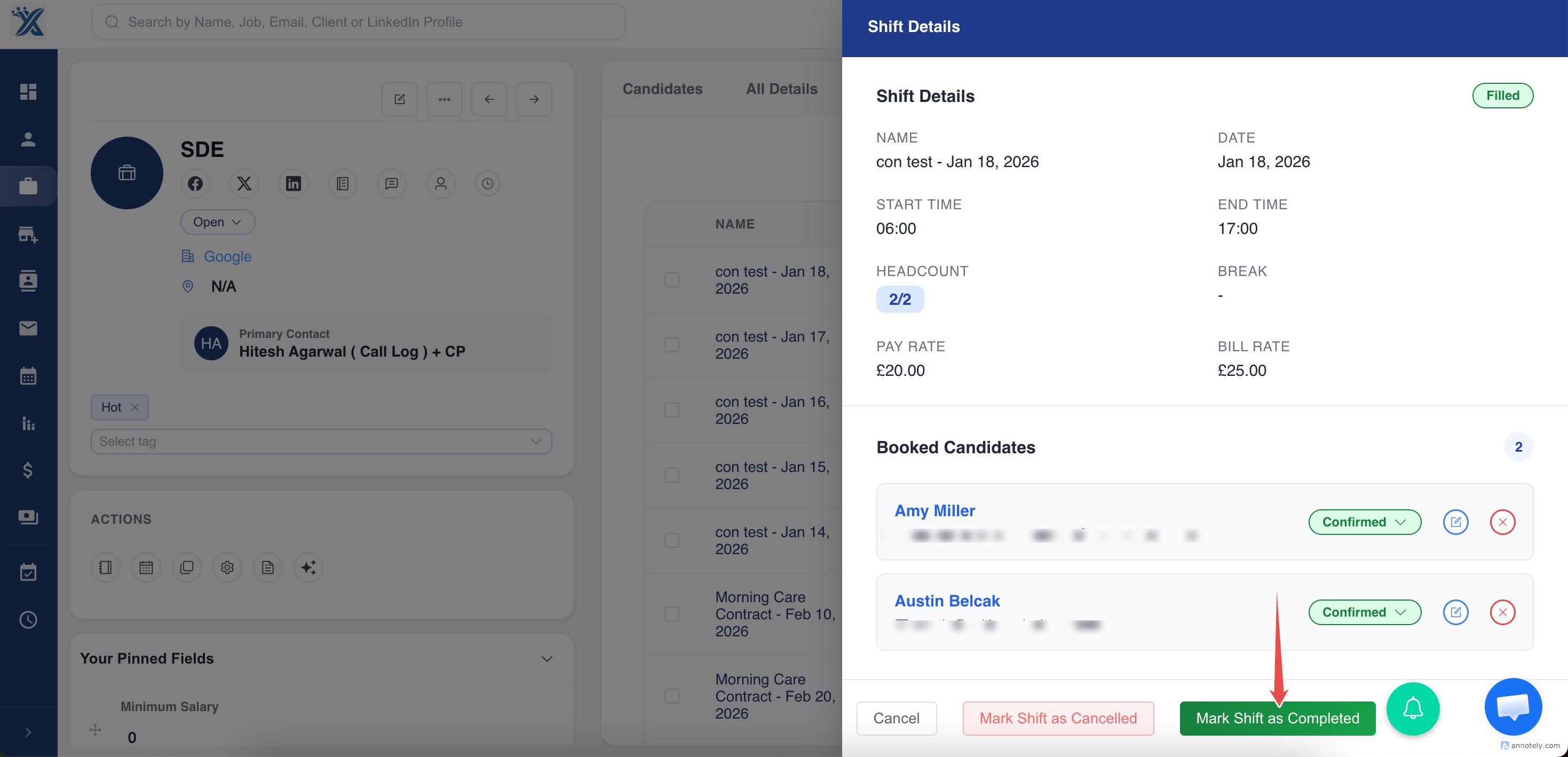
e. ATZ CRM automatically creates a Draft Timesheet
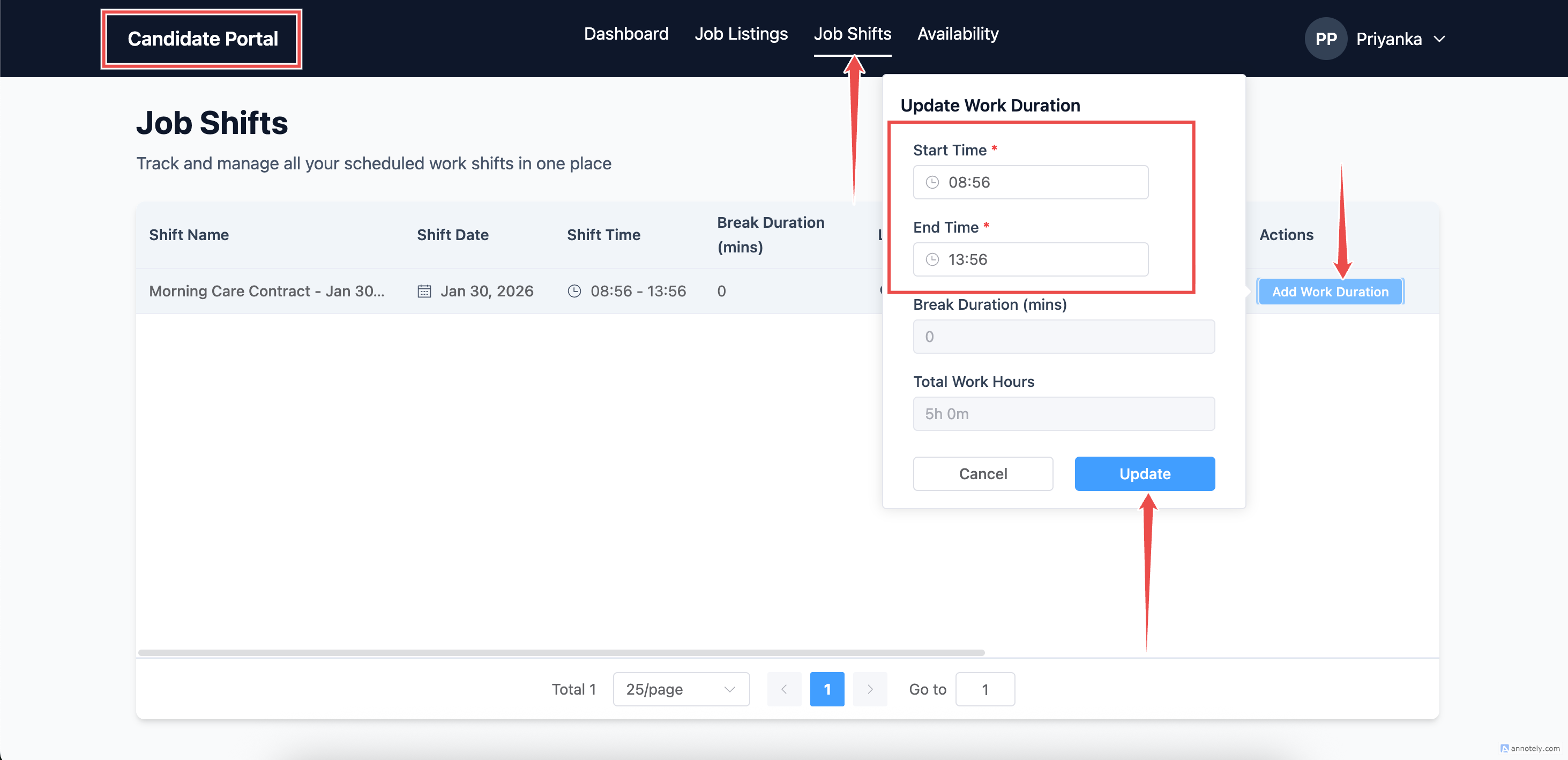
f. The candidate logs in and fills their hours
g. Recruiter reviews
h. The recruiter sends the timesheet details to the client for approval ( In Review )
i. Client approves or rejects (no login required) ( In Review )
j. Once approved, the timesheet is used for invoicing & payroll (In Review)
3. Creating a Shift (Planning Who Works)
Section titled “3. Creating a Shift (Planning Who Works)”A Shift represents a specific day and time when one or more candidates need to work.
To create a shift:
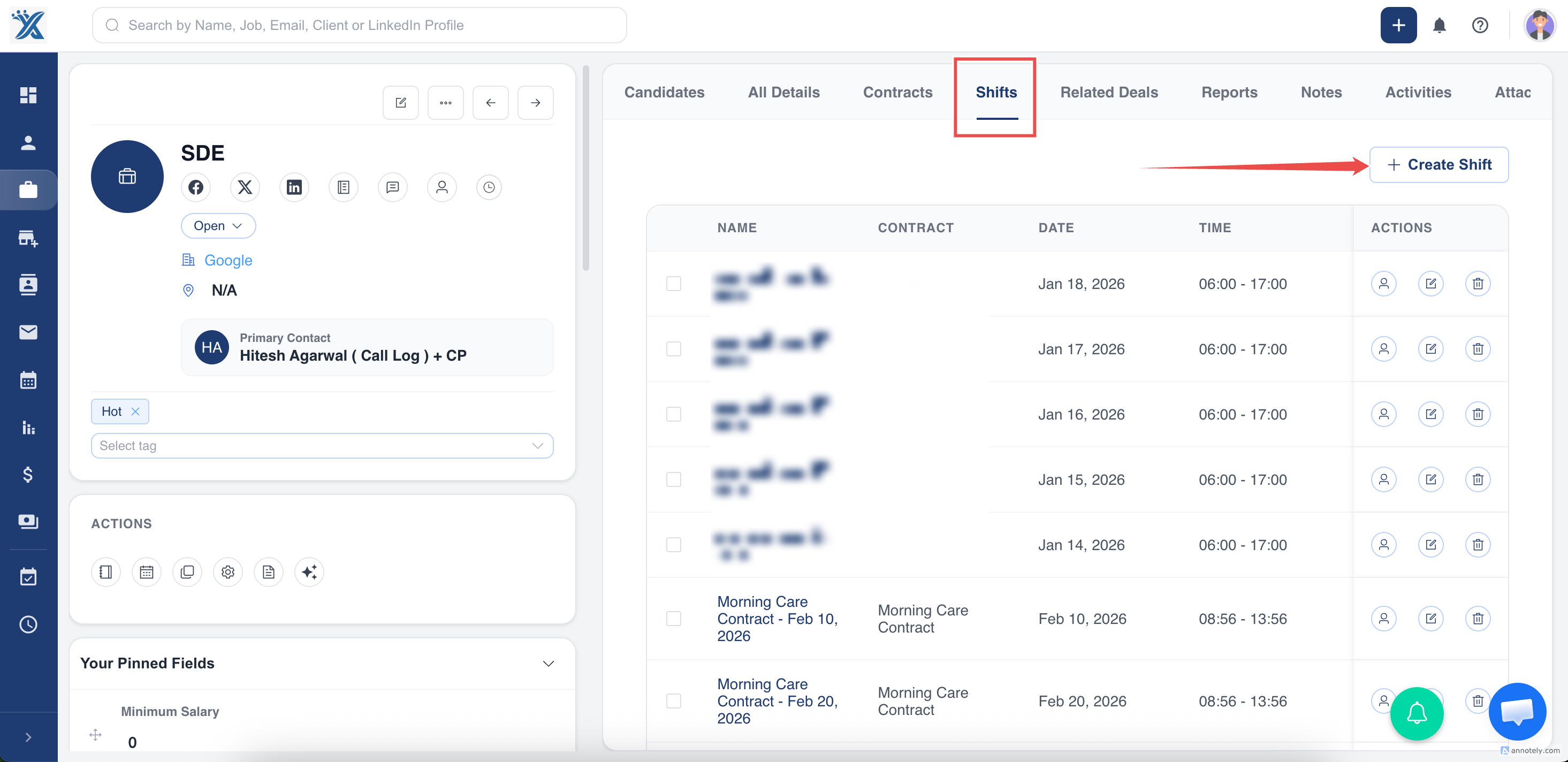
a. Open the Job
b. Go to the Shifts tab
c. Click Create Shift
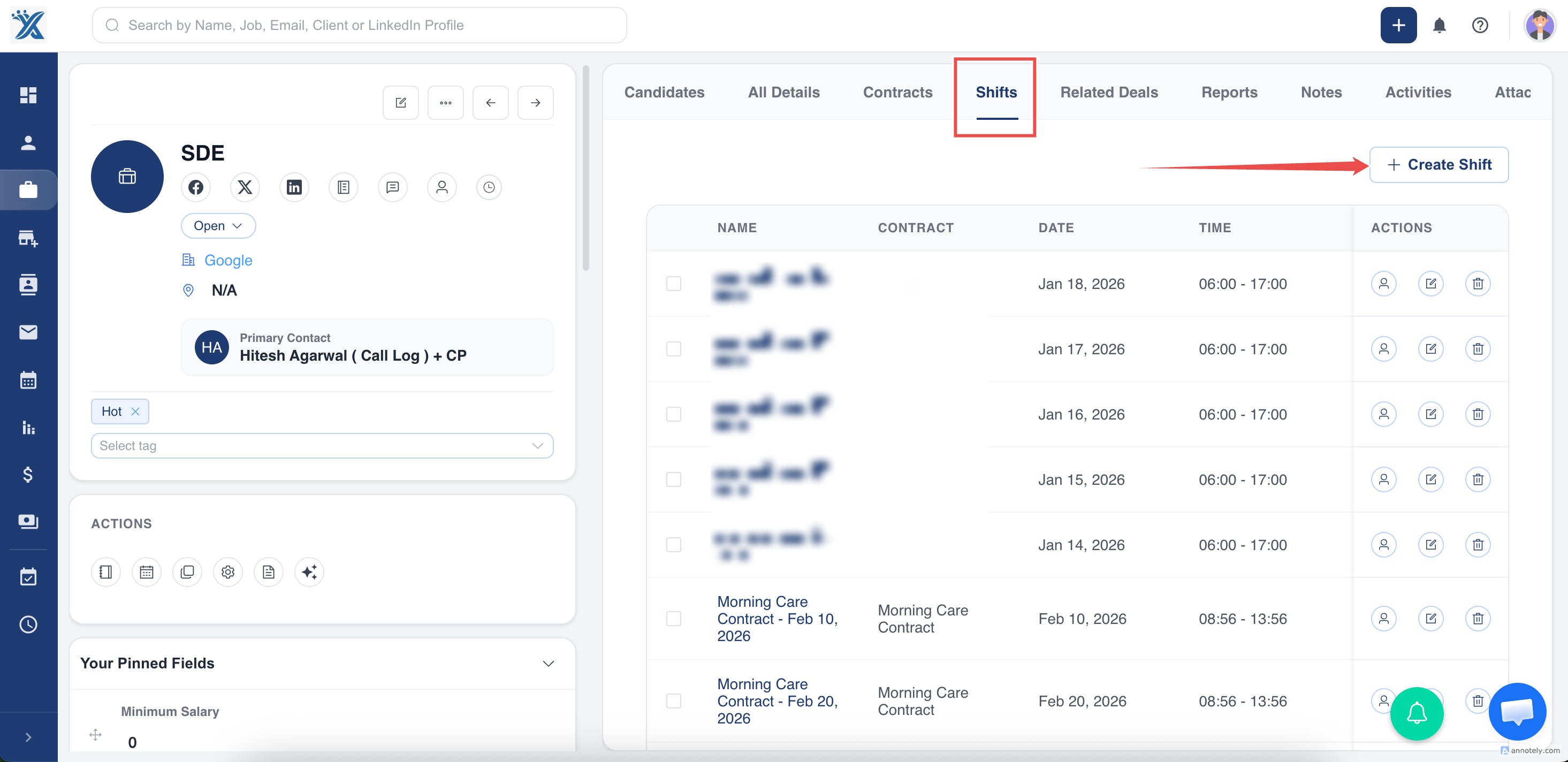
d. Enter:
- Date
- Start time & End time
- Break (if any)
- Required headcount
- Pay & bill rate (if applicable)
Save the shift.
This creates the planned schedule for that job.
4. Booking Candidates to a Shift
Section titled “4. Booking Candidates to a Shift”Once a shift is created:
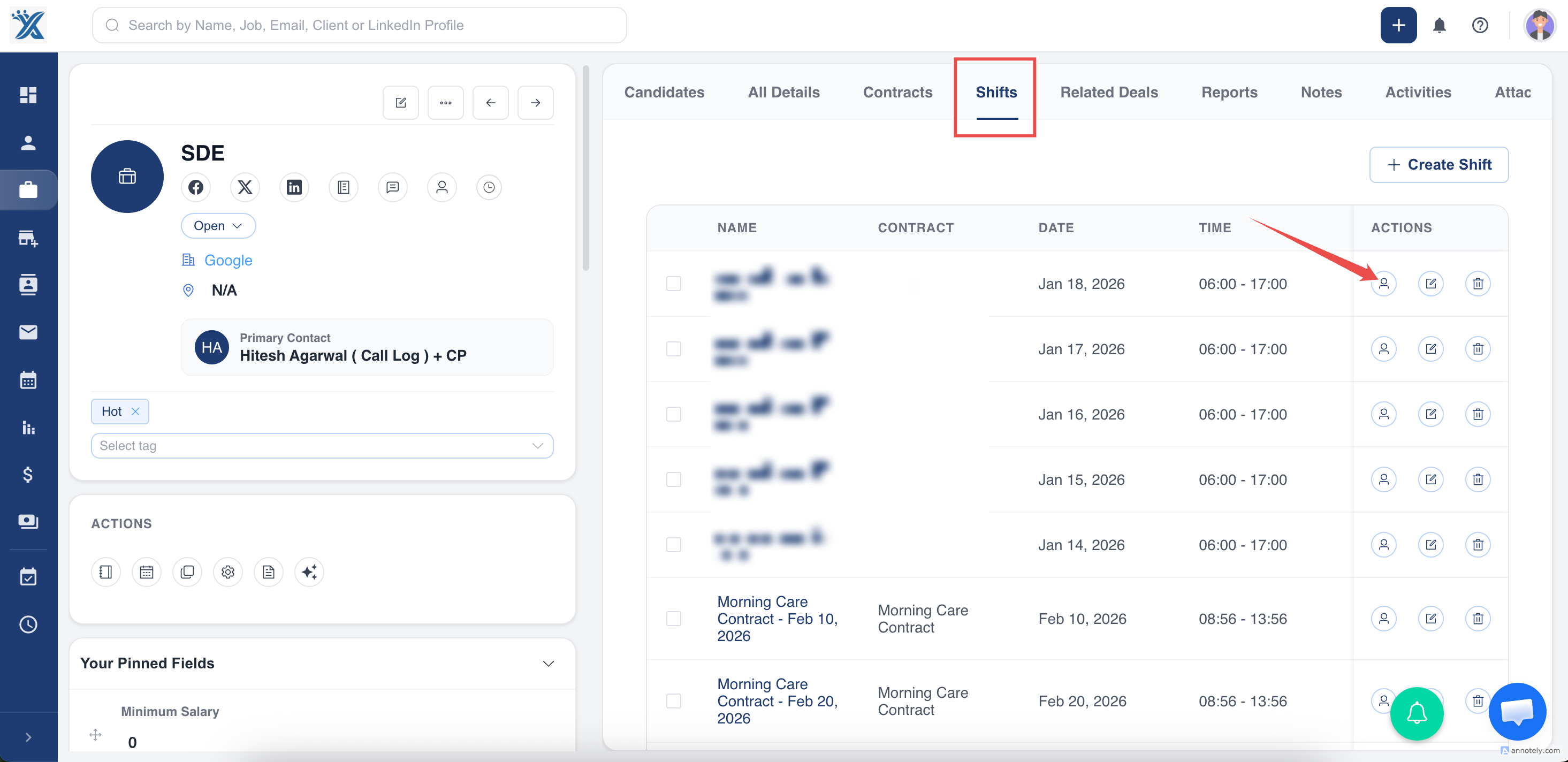
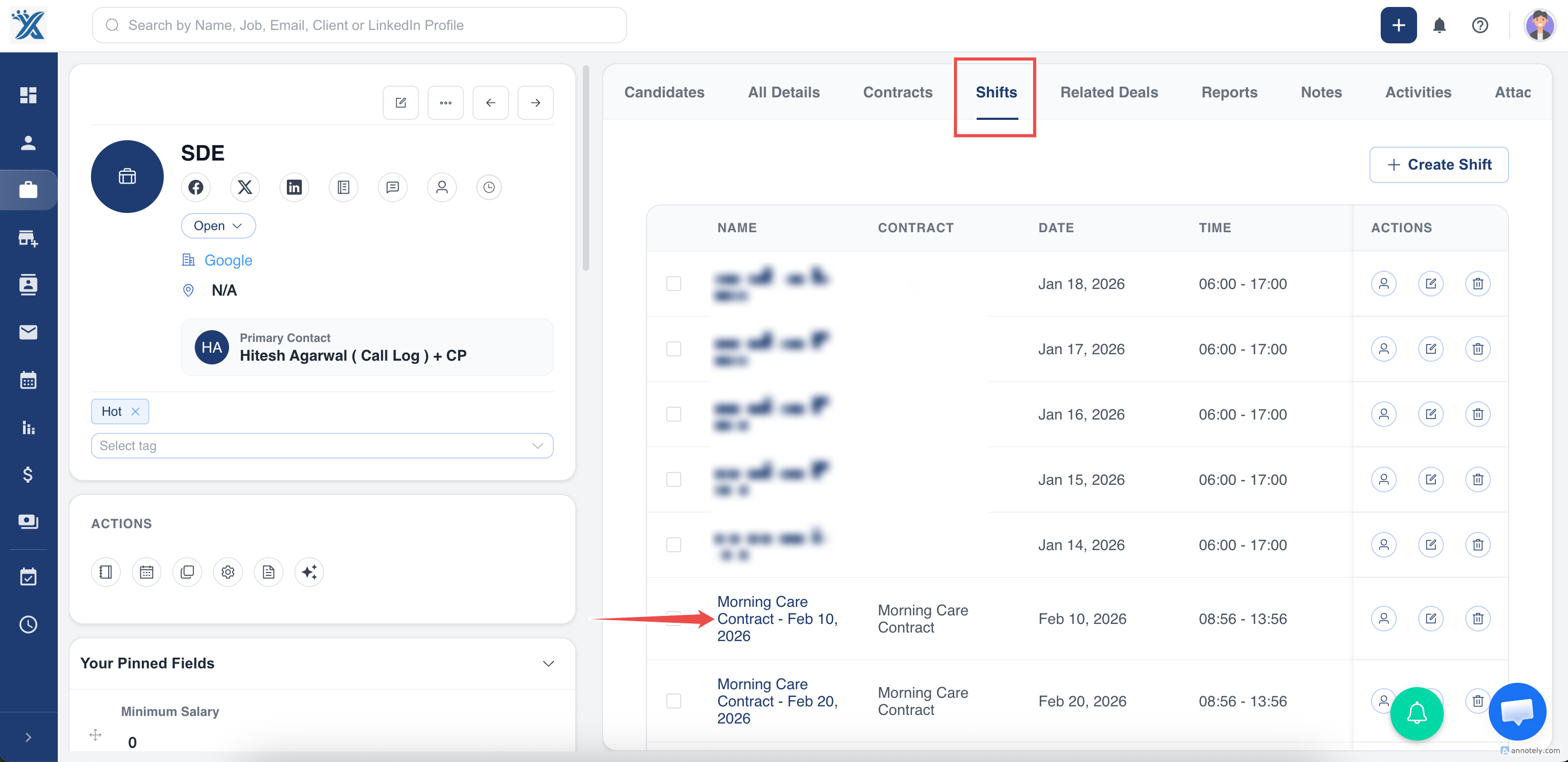
a. Open the ” Shifts ” Tab in Job Detail Page
b. Click ” Book Candidates” button for a Shift.
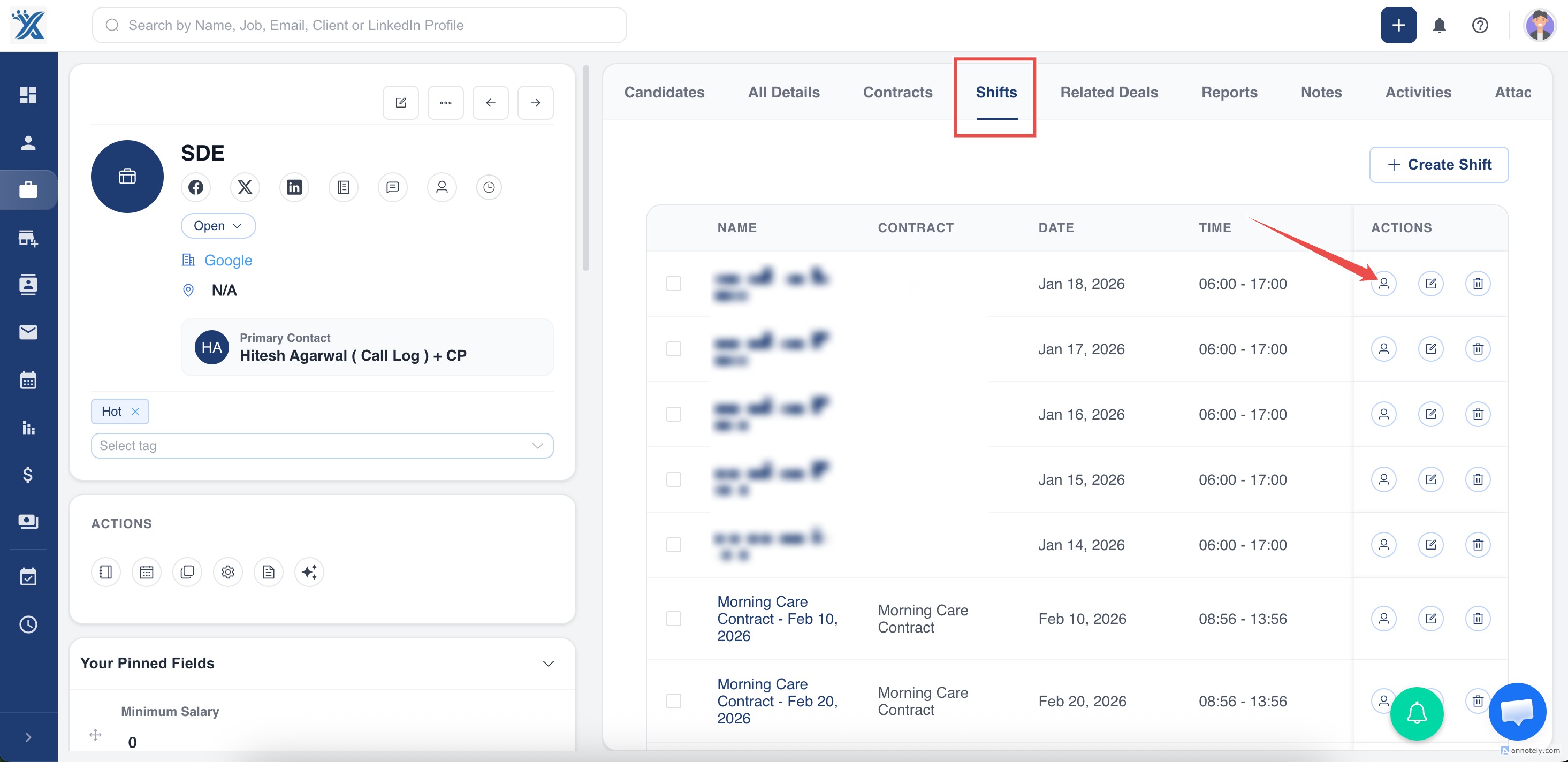
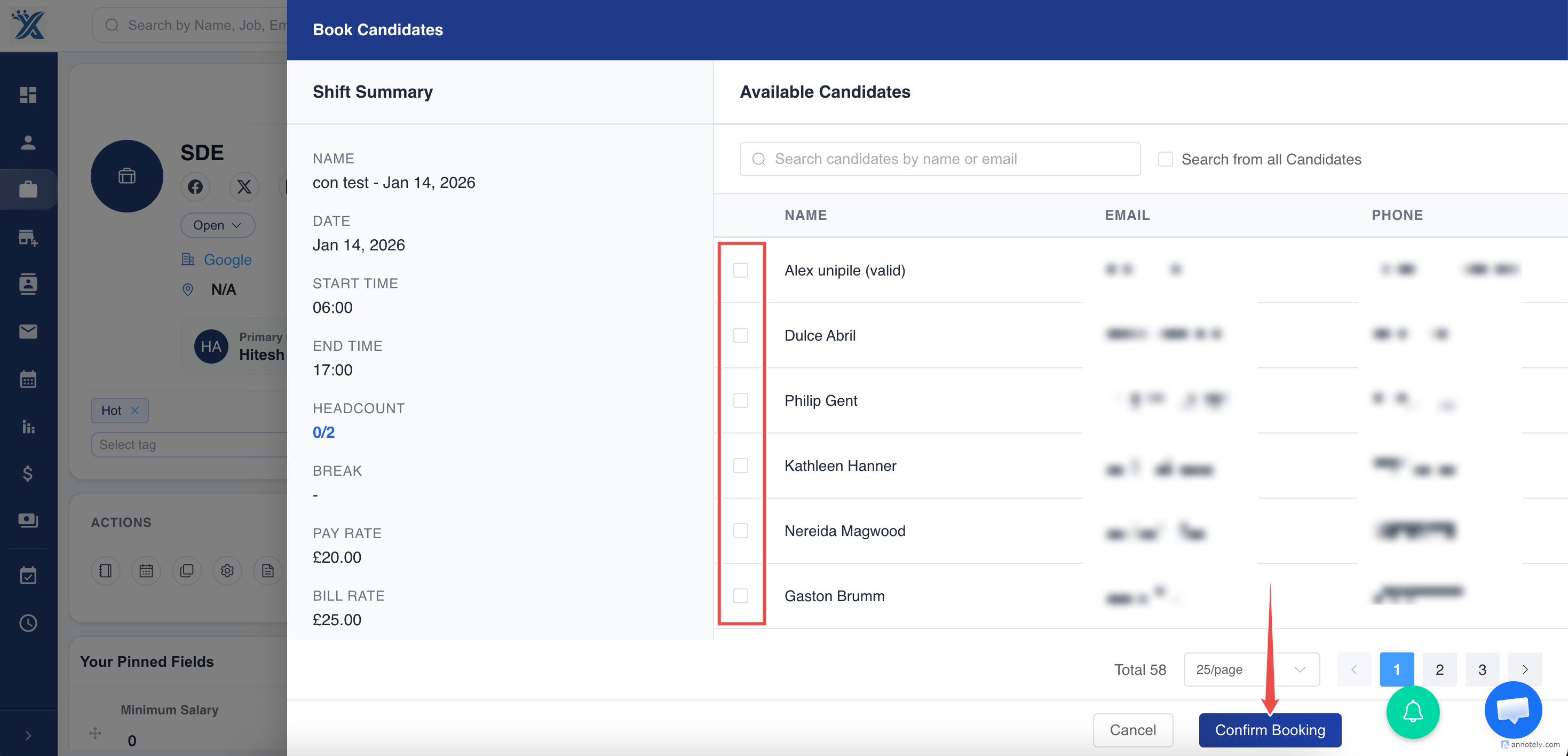
c. Select one or more candidates
d. Confirm booking
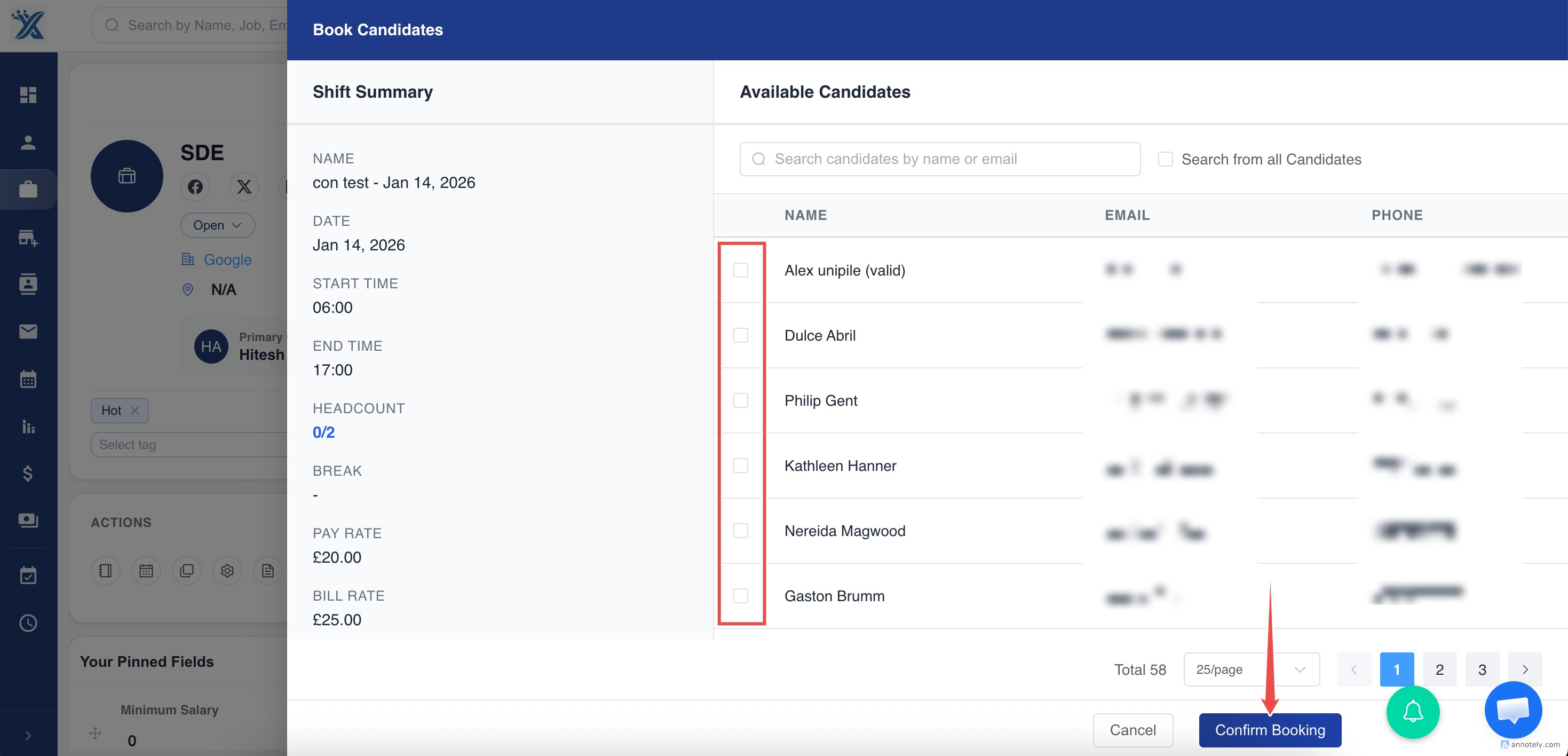
Rules that protect your data:
- A candidate cannot be double-booked for overlapping shifts
- You will be able to view the ” Candidate Availability ” for that day.
- Once required headcount is reached, the shift becomes Filled
- Each booked candidate is tracked individually
This replaces manual rosters or Excel schedules.
5. When the Shift is Completed
Section titled “5. When the Shift is Completed”After the work is finished:
- The recruiter marks the shift as Completed
This step is important because:
- Candidates should only enter hours after work is done
- It ensures records stay accurate
Once completed, ATZ CRM automatically creates a Draft Timesheet for each candidate.
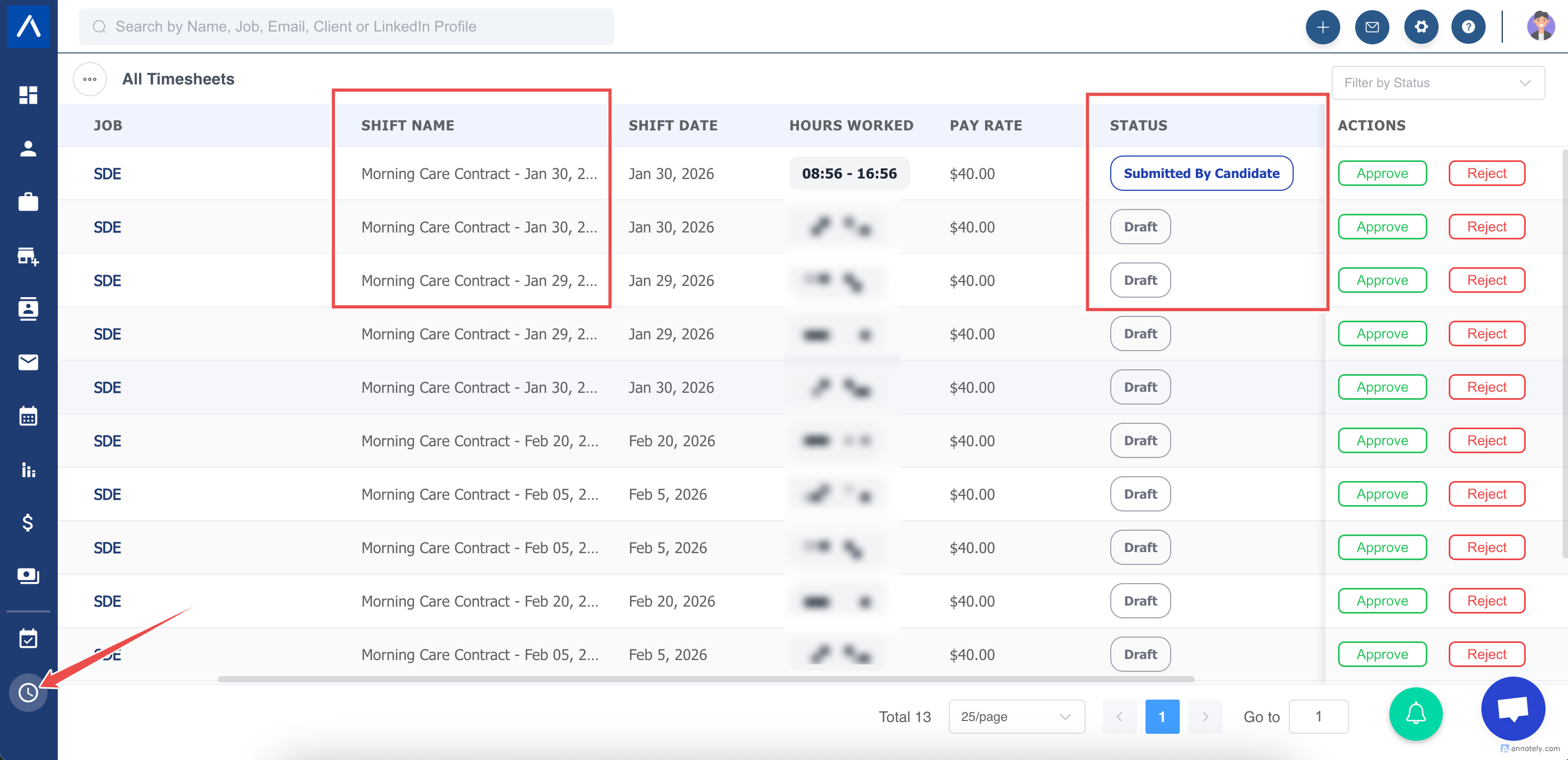
6. Candidate Submits Their Timesheet
Section titled “6. Candidate Submits Their Timesheet”Candidates submit their own hours via the Candidate Portal.
They enter:
- Actual start time
- Actual end time
- Total hours
Then they click Update.
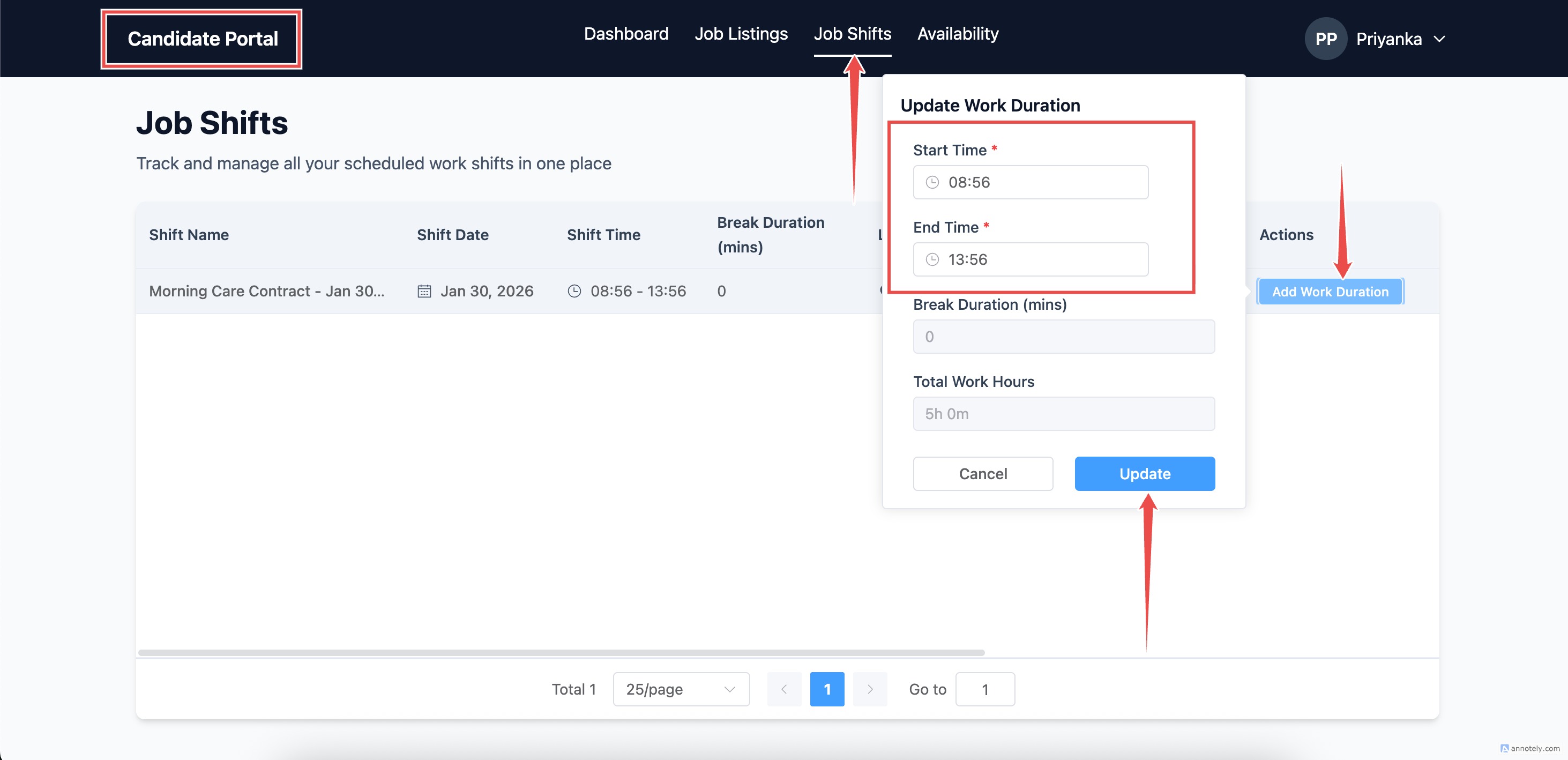
Controls to maintain accuracy:
- They cannot submit before the shift is completed
- They can only edit their own timesheet
- If rejected, they can resubmit
This replaces handwriting or texting hours to the recruiter.
7. Recruiter Review
Section titled “7. Recruiter Review”Before sending to the client, recruiters may:
- Review the hours
- Correct mistakes (if needed)
- Add notes
This helps prevent client disputes.
8. Sending Timesheet to Client for Approval
Section titled “8. Sending Timesheet to Client for Approval”Once submitted, Recruiters can send the timesheet to the client via email.
The email includes:
- Candidate name
- Job / Role
- Date
- Hours worked
- Buttons to Approve or Reject
Clients can approve:
- From their phone
- Without logging into a portal
- Even if different supervisors sign each shift
This matches real-world temp workflows.
10. Approved Timesheets → Invoicing & Payroll
Section titled “10. Approved Timesheets → Invoicing & Payroll”Once approved:
- The timesheet becomes locked
- Recruiters can:
- Export timesheets
- Attach them to invoices
- Send to back-office/payroll systems (e.g., GEMS)
No re-typing and no duplication.
11. Common Scenarios & How the System Handles Them
Section titled “11. Common Scenarios & How the System Handles Them”Candidate did not attend (No-Show)
Section titled “Candidate did not attend (No-Show)”- Mark as No-Show
- No timesheet is generated
- Nothing is billed
Candidate left early
Section titled “Candidate left early”- Candidate enters actual hours
- Client approves reduced time
Client rejects a timesheet
Section titled “Client rejects a timesheet”- Recruiter reviews the issue
- Timesheet returns to Candidate for resubmission
- Full audit trail is stored
Multiple candidates in the same shift
Section titled “Multiple candidates in the same shift”- Each candidate has their own:
- Timesheet
- Hours
- Approval record
Recurring shifts
Section titled “Recurring shifts”- Each day still produces an individual shift and timesheet
- Easier tracking and dispute resolution
12. Why This Workflow Benefits Recruiters
Section titled “12. Why This Workflow Benefits Recruiters”- No more paper or WhatsApp timesheets
- Higher accuracy and fewer disputes
- Faster approvals
- Clear audit history
- Works even when clients change signers day-to-day
- Designed for real-world temp operations
Final Summary
Section titled “Final Summary”ATZ CRM helps recruiters manage contract work the way they already do — but digital, cleaner, and faster.
You simply:
Plan the shift → Book candidates → Confirm hours → Get approval → Invoice confidently